Withdrawing money from your Employees’ Provident Fund (EPF) used to be a paperwork-heavy process. But now, thanks to the UMANG (Unified Mobile Application for New-age Governance) app, you can withdraw your PF amount easily from the comfort of your home — no queues, no stress!
In this guide, you’ll learn:
-
How to withdraw PF using the UMANG App
-
Which EPF forms to use for different types of withdrawal
-
Step-by-step process with visual aids
-
Pro tips for a smooth claim
-
Common errors to avoid
What is UMANG App?
UMANG is a Government of India mobile app that integrates major government services, including EPFO services like checking your PF balance, submitting claims, and tracking status.
Download it from:
Types of EPF Withdrawal Forms You Should Know
Before initiating the withdrawal, know which form to use:
Form No. |
Purpose |
|---|---|
Form 19 |
Final settlement (full withdrawal upon leaving job) |
Form 10C |
Pension withdrawal benefit or Scheme Certificate |
Form 31 |
Partial withdrawal (e.g. medical, marriage, education, home) |
Prerequisites Before You Start PF Withdrawal
Ensure the following are completed:
-
UAN (Universal Account Number) is activated
-
Mobile number is linked with UAN
-
KYC (Aadhaar, PAN, Bank Account) is updated in the EPFO records
-
Your EPF account is at least 5 years old for tax-free withdrawal
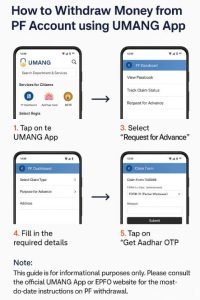
How to Withdraw PF Using the UMANG App – Step-by-Step
Step 1: Open UMANG App and Go to EPFO Services
-
Open the UMANG App
-
Search for “EPFO”
-
Select Employee Centric Services
Step 2: Select ‘Raise Claim
Tap on ‘Raise Claim’ from the available services.
Step 3: Enter UAN and OTP Verification
-
Enter your UAN
-
You’ll receive an OTP on your registered mobile number
-
Enter the OTP to proceed
Step 4: Select the Type of Withdrawal
Choose the type of claim:
-
Full EPF Settlement (Form 19)
-
Pension Withdrawal (Form 10C)
-
Partial Withdrawal (Form 31)
Step 5: Fill in Details and Submit the Claim
-
Enter withdrawal reason (for Form 31)
-
Confirm bank details
-
Upload scanned documents if required (Bank Passbook or Cancel Cheque)
-
Submit the request
You will receive an acknowledgment and can track the status in the app.
If you’re looking for a broker that offers speed, transparency, and advanced tools, Dhan is one of the best choices today. With zero brokerage on delivery trades and intuitive charts, Dhan is built for both beginners and pro traders. Invest in Stocks, F&O, Commodities, Currency, ETFs, Mutual Funds, SGBs, IPOs, SIPs and much more.
Click Here to Open Your Free Dhan Account
No paperwork. No account opening charges. Get started in 5 minutes! Dhan also offers advanced tools like TradingView & Options Trader built-in.
Documents Required For PF Withdrawal online
-
Aadhaar Card
-
PAN Card
-
Bank Account Details (linked with UAN)
-
Cancelled Cheque (for bank account verification)
-
Form 15G/15H (if applicable, to avoid TDS)
Pro Tips for a Smooth EPF Withdrawal
-
Ensure your Aadhaar is linked with UAN and bank account
-
Use Form 31 for advance withdrawals (e.g. COVID, marriage, house)
-
Avoid submitting multiple claims at once — wait for the first to process
-
Download the EPFO passbook to check contributions before applying
-
Always double-check your bank account details
How Long Does it Take to Get the PF Amount?
Generally, the PF amount is credited within 5–10 working days, but this can vary depending on verification and form type.
You can track the status from:
-
UMANG App
-
EPFO Member Portal
-
SMS from EPFO
Conclusion
Withdrawing your EPF money through the UMANG app is convenient, secure, and paperless. By following this guide and using the right form, you can get your money in just a few days.
Whether it’s for a medical emergency, house purchase, or simply post-retirement planning — the UMANG app puts your EPF at your fingertips.
If, you have liked the content please do share it with your friends or on social media, as sharing do bring the good karma. If you have any questions or feedback you can leave them in comment box below.
Disclaimer
The above process is subject to changes based on updates from EPFO and UMANG app. Users are advised to verify their eligibility and read the latest guidelines on the official EPFO website. This guide is for informational purposes only.